Monday, 10 June 2013
iOS 7 announced: new look, Siri, multitasking, toggles and more
Apple just updated both its platforms – we already saw the new Mac OS X, now it's time for iOS 7. It brings a ton of usability improvements, many of which we've found missing in iOS for quite a while now.
New look and more capable multitasking
iOS 7 brings a brand new look for the operating system with flatter icons and UI elements. All system icons are redesigned around a standardized grid to unify the look. It also brings animated wallpapers (not quite live wallpapers) and there's a dynamic parallax effect between the icons and the wallpaper as you turn and tilt your phone.
New lockscreen and app drawer
A much bigger change is a revamped multitasking system that allows apps to update much more often, while not wasting battery. To do that, iOS 7 keeps track when you use a specific app (all day, just in the morning and the evening) and lets the app update during that period. It also uses "opportunistic updates" – when you wake the device, it's going to use power anyway so iOS lets any available app update run in the background. It also keeps track of signal quality and if it's good, it updates multiple apps at once (since the radio is powered on anyway).
The new face of multitasking
Smarter Siri, better notifications, toggles
Yet another big update is the new Siri. It got a polished new interface and it goes after Google Now with card-based UI and new services to provide answers to your questions (Twitter, Wikipedia and Bing, take that Google). It can also control your iDevice (increase brightness, turn on Bluetooth) and it offers a new, more life-like voice (both female and male) for English, French and German.
Siri has a new voice, can answer more questions and do more things
There's more! The notification center has been rebuilt from the ground up to provide info about today's goings on (birthdays, weather, upcoming events from the calendar, stocks and even some info for tomorrow). Notification center also show up on the lockscreen. Also, once you dismiss a notification, it goes away on the other devices too so you don't have to see the same notification multiple times.
New notification area
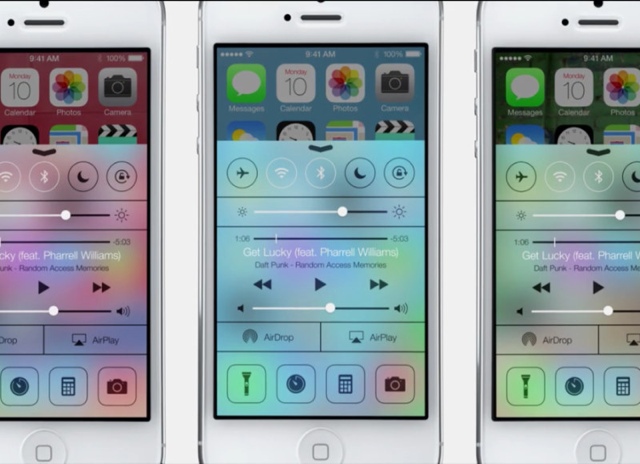
There are toggles too! You get to those by swiping up from the bottom of the screen. This launches something called Control center. You get controls for the screen brightness and the music player, the new AirDrop feature, and AirPlay along with some app shortcuts, including a flashlight toggle.
Toggles, brightness and music player controls, app shortcuts
New camera and gallery with automatic tagging
The camera got revamped too, it now features four modes – regular stills and video, square photos with color effects (hi, Instagram) and panorama.
The new camera has four modes - stills, video, squares and panoramas
The Photos app has been redesigned and now sort your photos based on where and when you took them - automatically putting a meaningful title to the collections. Zooming out shows new auto-generated albums for multi-day trips and zooming out even further groups the photos in years.
Photos automatically get tagged with location info like street name
Updates to Safari and App Store
The Safari browser for iOS was updated with a new 3D UI for switching tabs (looks kinda like the one Chrome for Android has) and you're no longer limited to only 8 tabs. The browser now features a single smart search filed rather than having two fields - one for URL typing and another one for initiating Google searches.
Safari with unlimited tabs, reading list, share links and Keychain
Safari will also show what tabs are open on your other devices and features the just announced iCloud Keychain integration, meaning it would be sync your passwords and credit card info with your Mac. The Reading list and Shared links features of the desktop Safari are available here too.
A cool new feature lets you swipe from the sides of the screen to go back and forth through your browsing history.
The App Store got tweaked too – it now automatically updates apps (hi, Play Store) and suggest apps based on your location (just like Windows Phone).
Location-based app recommendations
There's more: audio-only Facetime, AirDrop, iTunes Radio, Weather
Phew, we're already out of breath here but the Apple team isn’t done yet – Facetime got an audio only option, which is basically VoIP calling.
There's AirDrop, which is Apple's answer to NFC (they even made a joke about not having to bump your phones together). It;s a streamlined and centralized interface for sharing stuff with other people, who our close by. It uses a peer-to-peer Wi-Fi connection for that.
Finally, the Music player has been revamped as well and now it offers a new service, called iTunes Radio – an ad-supported streaming music service for free (launching in the US). This one is also available on Macs, PCs and even Apple TV.
The new iTunes Radio
There's also a cool new weather app that shows the weather in multiple cities with beautiful animations, a detailed forecast for today and tomorrow and the weather for the next five days. You can check the weather of one location or all of them at once.
The weather app is based on Yahoo!
iOS 7 is available for the iPhone in beta today. In the Fall, iOS 7 will be available on iPhone 4 and later, iPod touch 5th gen, iPad mini and iPad 2 and later.
For more-
http://www.apple.com/ios/ios7/
OS X 10.19
Apple has brought the tradition of naming its computer operating system after cats to an end. From now on, the California-based company will name its software after places in California. The latest version, OS X 10.9 is called “Mavericks,” named after a surfing area not too far from Apple’s headquarters.
The software won’t be ready for the public until the fall, but a handful of features were shown off today, including:
Finder tabs: Instead of having multiple Finder windows open, you can merge those windows into a single window with multiple tabs. The feature is similar to how certain tabbed web browsers work.
Tags: When saving a document, you can assign certain tags to it (Important, Draft, In Review, etc.) and pull up files that share the same tags.
Multiple displays: When using a second display, you can access the menu bar and dock on the extra screen. You can have a full-screen app open on each screen and drag assets between the two. Connecting to an Apple TV box via Airplay will turn the TV set that the box is connected to into a third display as well.
Battery life: Mavericks users power optimization features such as compressed memory, reduction of CPU utilization and “App Nap,” which manages how apps get access to system resources.
Safari: The Safari web browser has been updated with a sidebar containing your bookmarks, Reading List and a section called “Shared Links” that contains only updates from people you follow on Twitter and LinkedIn that contain links to various web content.
iCloud Keychain: iCloud Keychain securely stores all the passwords you use for different websites on whichever Apple devices you use and automatically inputs them for you when you need them. It’ll also suggest strong passwords for new sites you join and store those for you as well.
Apps with push notifications: Similar to the little pop-up notifications you’ll get on your smartphone, Mavericks will deliver pop-up notifications for certain apps in the upper right-hand corner of your screen, many of which you can respond to without actually launching the full app.
Maps and Calendar: Apple’s Maps app sports a feature that sends directions right to your iPhone’s lockscreen. There’s also deeper integration with Calendar app: For instance, creating a new calendar item will let you designate the location of, say, a meeting and then tell you when you need to leave based on your location and your destination.
For more
http://www.apple.com/osx/preview/
The software won’t be ready for the public until the fall, but a handful of features were shown off today, including:
Finder tabs: Instead of having multiple Finder windows open, you can merge those windows into a single window with multiple tabs. The feature is similar to how certain tabbed web browsers work.
Tags: When saving a document, you can assign certain tags to it (Important, Draft, In Review, etc.) and pull up files that share the same tags.
Multiple displays: When using a second display, you can access the menu bar and dock on the extra screen. You can have a full-screen app open on each screen and drag assets between the two. Connecting to an Apple TV box via Airplay will turn the TV set that the box is connected to into a third display as well.
Battery life: Mavericks users power optimization features such as compressed memory, reduction of CPU utilization and “App Nap,” which manages how apps get access to system resources.
Safari: The Safari web browser has been updated with a sidebar containing your bookmarks, Reading List and a section called “Shared Links” that contains only updates from people you follow on Twitter and LinkedIn that contain links to various web content.
iCloud Keychain: iCloud Keychain securely stores all the passwords you use for different websites on whichever Apple devices you use and automatically inputs them for you when you need them. It’ll also suggest strong passwords for new sites you join and store those for you as well.
Apps with push notifications: Similar to the little pop-up notifications you’ll get on your smartphone, Mavericks will deliver pop-up notifications for certain apps in the upper right-hand corner of your screen, many of which you can respond to without actually launching the full app.
Maps and Calendar: Apple’s Maps app sports a feature that sends directions right to your iPhone’s lockscreen. There’s also deeper integration with Calendar app: For instance, creating a new calendar item will let you designate the location of, say, a meeting and then tell you when you need to leave based on your location and your destination.
For more
http://www.apple.com/osx/preview/
Monday, 27 May 2013
iOS 7:Take a look
While Apple is expected to preview iOS 7, the next iteration of its mobile OS, at the upcoming WWDC event, more details about the operating system's new design have appeared.
According to 9To5Mac's sources, iOS 7 will be "black, white, and flat all over." The site reports that Apple's been constantly revising the user interface of the OS internally before it's finally revealed at the WWDC in June, so there could be many changes.
The report also offers some additional details about the UI changes. It mentions that Apple is coming up with a new Lock Screen interface and is likely to replace the shiny, transparent time bar that we see on the Lock screen with a shine-free, black colour interface. It will also swap the square-grid prompt for entering the Lock Screen pin code with round, black buttons that feature white text and white borders.
The report cites sources to inform that Lock Screen notifications might come with support for new gestures.
It also adds that the Notifications drop down will include new panels including new widgets and a panel with toggles for Wi-Fi, Airplane Mode, and Bluetooth. New widgets and settings toggles are a few things that iOS users have been asking for since a long time and other platforms including Android and even Symbian offer these to make user experience less cumbersome. It also suggests that the drop down Notification Center will become dark grey/ black with white text instead of the current dark linen textured background.
While the Home Screen's design is expected to remain the same, iOS 7 is expected to bring support for panorama wallpapers which has been present in Android. Users can set one large image as a wallpaper panning across all home screens.
The Home screen app icons will not be shiny and will lose shadows and gloss, though the buttons will still be round, as per the report.
Apple is likely to redesign native app icons with flatter, less skeuomorphic textures and the Camera, Game Center and Photos apps will sport new 'flat' icons.
Apple will also make changes to navigation and tab bars removing gradient textures in iOS7. However, the keyboard would remain more or less the same but would sport a lighter shade of grey, as per the website's sources.
The report also indicates that Apple has redesigned its apps inline with the conservative white, black, and flat theme of iOS 7. Apple might include a more uniform design though each native app is likely to have its own theme. The Weather app, App Store, Newsstand, Game Center, Safari and Camera are some of the apps that are likely to see a major redesign. It also suggests that Apple could bring a separate FaceTime app for the iPhone.
In addition to design related changes, iOS 7 is also expected to bring updated developer-focused features according to the site.
London: Apple's decision of redesigning its latest iOS 7 is speculated to present a ''black, white and flat'' look all over.
Jonathan Ive who became in charge of the look and feel of the Apple hardware and software last year, is reportedly not fond of skeuomorphic heavy designs, which currently dominate the iOS.
Apps like Mail, Calendar and Maps are suggested to have a more unified look. Additionally all the apps will share similar white base with its own unique colour scheme.
The report added that the green felt from Game Center and the wooden shelves from Newsstand have also been removed.
Apple is expected to unveil the new iOS 7 at WWDC 2013 that begins June 10.
The challenge for Apple is to balance its users'' need for something new with the familiarity to the system its hundreds of million users have, the report added.
The video was created by Christian Lue from ChanluChannel and Ran Avni from ConceptsiPhone. It envisions such improvements as Panorama Backgrounds, Quick Reply, Enhanced Siri Capabilities, Improved Music Player, Thumbnail Icons for Folders, Better Settings Control and a Flat UI.
Notably, a recent report leaked details about iOS 7 which did indicate the operating system would be 'black, white, and flat all over' and allow panoramic wallpapers.
Apple is expected to unveil iOS 7 at WWDC 2013 on June 10th.
ofcourse its black and flat all over
According to 9To5Mac's sources, iOS 7 will be "black, white, and flat all over." The site reports that Apple's been constantly revising the user interface of the OS internally before it's finally revealed at the WWDC in June, so there could be many changes.
The report also offers some additional details about the UI changes. It mentions that Apple is coming up with a new Lock Screen interface and is likely to replace the shiny, transparent time bar that we see on the Lock screen with a shine-free, black colour interface. It will also swap the square-grid prompt for entering the Lock Screen pin code with round, black buttons that feature white text and white borders.
The report cites sources to inform that Lock Screen notifications might come with support for new gestures.
It also adds that the Notifications drop down will include new panels including new widgets and a panel with toggles for Wi-Fi, Airplane Mode, and Bluetooth. New widgets and settings toggles are a few things that iOS users have been asking for since a long time and other platforms including Android and even Symbian offer these to make user experience less cumbersome. It also suggests that the drop down Notification Center will become dark grey/ black with white text instead of the current dark linen textured background.
While the Home Screen's design is expected to remain the same, iOS 7 is expected to bring support for panorama wallpapers which has been present in Android. Users can set one large image as a wallpaper panning across all home screens.
The Home screen app icons will not be shiny and will lose shadows and gloss, though the buttons will still be round, as per the report.
Apple is likely to redesign native app icons with flatter, less skeuomorphic textures and the Camera, Game Center and Photos apps will sport new 'flat' icons.
Apple will also make changes to navigation and tab bars removing gradient textures in iOS7. However, the keyboard would remain more or less the same but would sport a lighter shade of grey, as per the website's sources.
The report also indicates that Apple has redesigned its apps inline with the conservative white, black, and flat theme of iOS 7. Apple might include a more uniform design though each native app is likely to have its own theme. The Weather app, App Store, Newsstand, Game Center, Safari and Camera are some of the apps that are likely to see a major redesign. It also suggests that Apple could bring a separate FaceTime app for the iPhone.
In addition to design related changes, iOS 7 is also expected to bring updated developer-focused features according to the site.
Apple’s new Weather application is said to include slightly animated images to notate types of weather such as rain, sun, or snow. One source says that it is similar to the above design recently posted to Dribbble.
Game Center, unsurprisingly, has been stripped of green felt. Newsstand has been tweaked to remove the wood-shelf interface. It is likely that the wood will be replaced with a texture slightly reminiscent of OS X Mountain Lion’s app dock. Safari for iPhone’s design has been tweaked, particularly in the tabs view.
The App/iTunes/iBook stores will pick up a flatter, white look (as opposed to the current dark black theme). Additionally, due to confusion from users looking to FaceTime, the iPhone may now include a standalone FaceTime app like the iPad and iPod touch. In previous versions of the iPhone software, FaceTime video calling has been tucked away into the Phone application.It's possible that the new version of iOS would first release for the iPhone as Apple is prioritising it over iPad's software. iOS 7 is likely to release in fall with a new iPhone.London: Apple's decision of redesigning its latest iOS 7 is speculated to present a ''black, white and flat'' look all over.
Jonathan Ive who became in charge of the look and feel of the Apple hardware and software last year, is reportedly not fond of skeuomorphic heavy designs, which currently dominate the iOS.
New Features:
While iOS 7 is heavy on design changes, the operating system also includes some various new features across the board. We previously reported that iOS 7 will likely include integration for Flickr and Vimeo in addition to improved in-car support for Maps and Siri. While the new interface will be a major change for consumers, sources say that iOS 7 is also an ambitious update for developer-focused featureAccording to a BBC report, the latest design of the Apple iOS is speculated to be devoid of the textures on its notification panel and gloss or shadows on its icons and apps but the corners will remain rounded.Apps like Mail, Calendar and Maps are suggested to have a more unified look. Additionally all the apps will share similar white base with its own unique colour scheme.
The report added that the green felt from Game Center and the wooden shelves from Newsstand have also been removed.
Apple is expected to unveil the new iOS 7 at WWDC 2013 that begins June 10.
The challenge for Apple is to balance its users'' need for something new with the familiarity to the system its hundreds of million users have, the report added.
Notably, a recent report leaked details about iOS 7 which did indicate the operating system would be 'black, white, and flat all over' and allow panoramic wallpapers.
Apple is expected to unveil iOS 7 at WWDC 2013 on June 10th.
ofcourse its black and flat all over
Friday, 24 May 2013
Xbox One
okay here we are
we all have been specifically waiting for the xbox One as you know and all of us had made alot of speculations
lets see the real thing
FEATURES-
we all have been specifically waiting for the xbox One as you know and all of us had made alot of speculations
lets see the real thing
FEATURES-
With a powerful 8-core CPU, 8GB of RAM, and a 500 GB hard drive, this new Xbox is a beast. Unlike Sony, Microsoft had no qualms showing off the hardware, so now we know more about the Xbox One than we do the PS4 in some ways. Sadly, there was no mention about used games or always-on demands.the remote looks more like a batrang
Fundamentally, this is an incredible step-up in performance from the eight-year-old Xbox 360. With HDMI inputs and outputs, a Blu-ray drive, 802.11n with WiFi Direct, and USB 3.0, this is a full realization of what a modern console should be. While we didn’t get the same nitty-gritty technical details from Microsoft, we still have a pretty good idea of how the internals stack up to the PS4 and modern PCs. The single 40nm SoC inside it from AMD will house both a CPU and GPU, so that’s an incredible step forward from the 360′s dual 90nm chips. No, this Xbox One won’t stomp a modern $800 gaming PC into the ground, but it still has plenty to offer in terms of user experience.
Microsoft is going big with the next Kinect. It will feature a 1080p RGB camera with a wider field of view for easier operation — a much welcome feature from current Kinect owners. It will run at 30 frames per second, and Microsoft promises a lag-free experience. Actually, Microsoft is extremely focused on speed this time around, so hopefully laggy menus are a thing of the past. With the new voice experience on the Xbox One, you can instantly switch between games, apps, and even live TV. Just by issuing a short verbal command like “Watch TV” to the Kinect, your Xbox One will take in a live feed from your cable box (over HDMI), and pipe it through without need to change inputs. If it works in reality like it does in the demo, that feature alone might be worth the hardware upgrade.
More importantly, Microsoft is seemingly quite focused on making games. With 15 exclusive internally developed games expected within the first year of the Xbox One, it’s clear that the Xbox One is still a gaming console first and foremost. With strategic partnerships with EA and Activision, the Xbox One is staying focused on the core base of online gamers that it has built up over the 360′s lifespan. That said, Microsoft is still working on branching out to new non-gaming markets. Halo is an incredibly popular game, but with an original episodic release of a Halo series made by none other than Steven Spielberg, it could find an even bigger audience.
Xbox Live is also getting a big upgrade alongside the Xbox One. By the end of the year, over 300,000 servers around the world will be dedicated to nothing but Xbox Live. With games, saves, music, and movies all moving to the cloud, it’s no surprise that Microsoft has needed to expand to such a large scale. Now that this new console will have built-in game capture and upload, they’re going to need a lot of storage and bandwidth to keep these user-generated videos online. Many expected a partnership with Twitch for video streaming and hosting, but it seems that Microsoft is going at it alone.
The biggest disappointment was the noticeable absence of a few specific details. The Xbox One is launching later this year, but a firm release date is nowhere to be found. No mention of price, so now we wait to see which company with blink first at E3. Worse, there was no reference at all to locking out used games or requiring an internet connection. Has Microsoft learned nothing from the past two months of out of control rumors and the whole Adam Orth ordeal? The lack of confirmation one way or the other is just going to make the internet hand-wring even more intense. Hopefully, the Microsoft press event at E3 will answer all of these burning questions.
upcoming gamesGame Developer Release Date
| Assassin's Creed 4 [2] | Ubisoft Montreal | TBA |
| Battlefield 4[3] | EA Digital Illusions CE (DICE) | TBA |
| Call of Duty: Ghosts [4] | Infinity Ward | 11.5.2013[5] |
| Destiny [6] | Bungie | TBA |
| Dying Light[7] | Techland | TBA |
| FIFA Soccer 14 [8] | EA | TBA |
| Forza Motorsport 5[9] | Turn 10 | TBA |
| Madden 25[10 | EA | TBA |
| NBA Live 14[11] | EA | TBA |
| Need for Speed Rivals[12] | EA | TBA |
| Quantum Break [13] | Remedy Entertainment | TBA |
| Ryse | Crytek | TBA |
| Thief [14] | Eidos Studios Montreal | TBA |
| EA Sports UFC [15] | EA | TBA |
Watch Dogs| Ubisoft | TBA
UNCONFIRMED
| Game | Source and Information |
|---|---|
| Wolfenstein: The New Order | Bethesda and MachineGames' next Wolfenstein game has been announced for "next-gen consoles" and is coming in Fall 2013. [17] |
| Halo 5 | Before the release of Halo 4, 343 Industries confirmed that it was the first part of a new Halo trilogy. [18] In 2012, 343 job listings were posted “to help create the current and next generation of game visuals in the Halo universe.” [19] |
| Dragon Age III: Inquisition | Despite being announced by BioWare for a release in 2013, the resume of an EA Shanghai level designer suggested that the "scope" of the game has changed and that it "will be postponed to 2014" and "target next gen platforms." [20] |
| The Evil Within | The newest game from Resident Evil creator Shinji Mikami was announced by Bethesda for a 2014 release on "next-generation consoles," [21] |
| Next-Gen Family Game | An anonymous source suggested that the next Xbox will launch with “a family game set on an island with Pixar movie-style graphics” that “will utilize Kinect to scan a body and generate a virtual character in the game.” [22] |
| The Witcher 3: Wild Hunt | Witcher 3 was officially announced by CD Projekt RED for release in 2014 and is set to target "all top of the line consoles and PC." It was advertised as "a next generation RPG."[23] |
| Next-Gen Zombie Game | An anonymous source suggested that the next Xbox will launch with "a zombie game," which has caused some to speculate that it could be Dead Rising 3. [24] |
| Rainbow 6: Patriots | Ubisoft CEO Yves Guillemot said Rainbow 6: Patriots is still in development and "there's a good chance it can be” pushed to next-generation consoles. [25] |
| Mafia III | Rumors suggest that Mafia III is in development at 2K Czech and was delayed in order to shift to next-generation consoles. [26] |
| Doom 4 | Bethesda confirmed that an early version of Doom 4 "did not exhibit the quality and excitement that Id and Bethesda intend to deliver and that Doom fans worldwide expect" and was canceled in favor of a new one. Rumors suggest that the game is targeting next-generation consoles and that a planned sequel to Rage was canceled in order to add more members to the Doom 4 development team. [27] |
| Ready at Dawn Next-Gen Game | The developers of the God of War PSP games are developing "an exciting new AAA IP for a Next-Generation home console game system." [28] |
| Square-Enix "Luminous" Games | Square-Enix is showing off its "Luminous" tech engine, capable of highly realistic next-gen graphics. Luminous will make games 30% cheaper and shorten development cycles. [29] |
| Homefront Sequel Game | Perhaps titled Homefront 2, Crytek is developing this game (and was the company that originally outed the Xbox One's Durango codename.)[30] |
| Lionhead Studios Next-Gen Game | The studio (sans Molyneux) has been on the lookout for programmers with experience using the Unreal Engine, and "significant experience leading teams designing and implementing modern rendering engine." Example given is DirectX11, which is rumored to be compatible with the Xbox 360's successor. [31] |
| Rare 'Historic' Franchise | Rare says a "Historic" franchise will be making a comeback. This could easily be Perfect Dark (Zero was a launch title for the 360) or even Banjo-Kazooie. It could also be a Killer Instinct title.[32] |
Labels:
Assasins creed,
call of duty,
Fifa,
Microsoft,
One,
wolfstein,
Xbox
Wednesday, 22 May 2013
send a scent with your iPhone
okay guys sorry for this pretty long delay but here you go!
MINATO, Japan – ChatPerf has unveiled up with a new product that allows users to send scents to their contacts, but no where close to Google’s April Fools’ joke.
Readers may remember a Pepper Spray case for iPhone 4/4s that attached a spray canister to the back of the device that could be used in case of an attack. However, apart from the physical extension of a liquid bottle at the end of the phone, there is not much common between them.
For ChatPerf’s product, the bottle fixed to the lower end of a phone carries liquid in it. This liquid is mixed and then dispersed as per the command of the accompanying app, Scentee.
http://www.youtube.com/watch?feature=player_embedded&v=0klQnTscgRs
(This device is an attachment for smartphones which enables scent to be used in mobile communication or games.
"For example, suppose you want to send a message to a friend via a social network, maybe because you know your friend is tired. You can use this to send a relaxing scent along with your message. You can also use it to add scent to the notification sound whenever you get a new e-mail. We also think this device could be used with games. It could have all kinds of applications, so for example, in a shooting game, shots could be accompanied by the smell of gunpowder."
"Regarding our business model, the idea is that customers will be able to buy all kinds of scents in tanks like this."
"When we release this, we'd like to offer several kinds of game and social content ourselves. We've already released an SDK that links applications and devices. So, we hope that developers, both companies and individuals, will turn lots of ideas into apps."
"This is still a prototype and it uses the dock connector compatible with smartphones up to the iPhone 4S. We'd also like to support Android phones, so our version for release this September will connect to the phone's earphone jack. The design will also be a lot more stylish. So, this is really something to look forward to."-diginews)
Monday, 1 April 2013
Transparent iPhone 6 confirmed by Apple Inc.
By Soham
It’s official (or as official as it gets with Apple). The Cupertino-based tech giant will release a transparent iPhone 6 that might have a transparent glass display on both sides, giving the user the choice of rendering the content in one seamless continuous presentation across the device, or in two individual displays.
Even as rumours about a transparent iPhone 6 (read: iPhone 6 rumours: Transparent, scratch-free screen… features to kill Galaxy S4?) refuse to die down, official details of a ‘wraparound display’ have been revealed, making the iPhone 6 as futuristic in looks as it gets.
In fact, with one masterstroke, Apple will be doubling the screen size of the upcoming iPhone 6 to about 10 inches without losing the handheld functionality. Now that’s the kind of genius innovation we expect from Apple, not incremental additional centimetres to the existing screen.
If this indeed comes true, it – and mark our words – will be the biggest thing to happen to iPhone since the iPhone. In fact, gauging by customer anticipation and response, it may well be the biggest thing to happen to Apple since Apple.
Here are the details.
Last week, on March 27, 2013, the US Patent & Trademark Office (USPTO) published a patent application from Apple that reveals a future iPhone with a wraparound display so that both sides of this smartphone will be able to display content, either individually or as one continuous display.
According to information and images published by Patently Apple, the wraparound display will also apply to Apple’s possible future wristband communication device, or the much-awaited iWatch, details of which were revealed in February.
Flexible, transparent display
As described in the patent information, the latest iPhone could indeed sport a flexible wraparound display that could be fashioned in aluminium, aluminium and glass, or a fully transparent design.
Fully transparent? Yes, that’s what we’ve been talking about, baby.
According to its patent, Apple states that the design could also be fully formed of transparent (or at least semi-transparent) material such as glass.
Indeed, features will include not just a transparent screen, but a flexible one too – and one that will allow you to scribble notes on it with an ordinary pen, pencil, or your fingernails. Now that’ll be something, ain’t it?
Apple states that one of the advantages of using a polyimide substrate is that the AMOLED display screen can be heated that allows the AMOLED display screen to be configured into any number of shapes.
Moreover, once the heat is removed, the AMOLED display will then ‘remember’ the original shape even if temporarily rolled up or flattened out. In this way, by heating AMOLED display assembly while configured in a shape in accordance with transparent housing AMOLED display assembly easily conforms to the shape of transparent housing.
“In one embodiment, a consumer electronic product is described which includes at least a transparent housing and a flexible display assembly enclosed within the transparent housing. In the described embodiment, the flexible display assembly is configured to present visual content at any portion of the transparent housing,” the recent patent further details.
Look ma, no buttons
This future iPhone design won’t have any physical buttons – so controlling the audio on the iPhone will simply require you to hover your hand over the side of the display to temporarily illustrate the controls on the device’s display (actually, the entire device will be the smartphone’s display).
And with the entire smartphone built out of flexible, transparent glass, there will be no need – or place – for physical buttons on the device. Just virtual ones, thank you. The virtual functionality of the buttons would allow a user to hold a finger over the button, say, a volume indicator, and an action would be triggered by that simple action.
3D in a continuum
Apple states that visual content can be presented by the first flexible display out of a temporal phase with the visual content presented by second flexible display. In this way, an illusion of depth perception can be presented mimicking a 3D experience.
In effect, the new iPhone 6 could also produce 3D visuals through its unique dual display design.
Moreover, utilising a flexible display can provide additional viewing area without increasing either the size or shape of the iPhone. For example, a flexible display can be folded in such a way as to form a continuous loop such that images (still or video) can be presented in a wrap-around manner in which the images appear to be presented in a continuous loop.
This is certainly one of Apple’s hottest inventions of the year. One that has the potential to sweep us off our feet. About time, Apple.
It’s official (or as official as it gets with Apple). The Cupertino-based tech giant will release a transparent iPhone 6 that might have a transparent glass display on both sides, giving the user the choice of rendering the content in one seamless continuous presentation across the device, or in two individual displays.
Even as rumours about a transparent iPhone 6 (read: iPhone 6 rumours: Transparent, scratch-free screen… features to kill Galaxy S4?) refuse to die down, official details of a ‘wraparound display’ have been revealed, making the iPhone 6 as futuristic in looks as it gets.
In fact, with one masterstroke, Apple will be doubling the screen size of the upcoming iPhone 6 to about 10 inches without losing the handheld functionality. Now that’s the kind of genius innovation we expect from Apple, not incremental additional centimetres to the existing screen.
If this indeed comes true, it – and mark our words – will be the biggest thing to happen to iPhone since the iPhone. In fact, gauging by customer anticipation and response, it may well be the biggest thing to happen to Apple since Apple.
Here are the details.
Last week, on March 27, 2013, the US Patent & Trademark Office (USPTO) published a patent application from Apple that reveals a future iPhone with a wraparound display so that both sides of this smartphone will be able to display content, either individually or as one continuous display.
According to information and images published by Patently Apple, the wraparound display will also apply to Apple’s possible future wristband communication device, or the much-awaited iWatch, details of which were revealed in February.
Flexible, transparent display
As described in the patent information, the latest iPhone could indeed sport a flexible wraparound display that could be fashioned in aluminium, aluminium and glass, or a fully transparent design.
Fully transparent? Yes, that’s what we’ve been talking about, baby.
According to its patent, Apple states that the design could also be fully formed of transparent (or at least semi-transparent) material such as glass.
Indeed, features will include not just a transparent screen, but a flexible one too – and one that will allow you to scribble notes on it with an ordinary pen, pencil, or your fingernails. Now that’ll be something, ain’t it?
Apple states that one of the advantages of using a polyimide substrate is that the AMOLED display screen can be heated that allows the AMOLED display screen to be configured into any number of shapes.
Moreover, once the heat is removed, the AMOLED display will then ‘remember’ the original shape even if temporarily rolled up or flattened out. In this way, by heating AMOLED display assembly while configured in a shape in accordance with transparent housing AMOLED display assembly easily conforms to the shape of transparent housing.
“In one embodiment, a consumer electronic product is described which includes at least a transparent housing and a flexible display assembly enclosed within the transparent housing. In the described embodiment, the flexible display assembly is configured to present visual content at any portion of the transparent housing,” the recent patent further details.
Look ma, no buttons
This future iPhone design won’t have any physical buttons – so controlling the audio on the iPhone will simply require you to hover your hand over the side of the display to temporarily illustrate the controls on the device’s display (actually, the entire device will be the smartphone’s display).
And with the entire smartphone built out of flexible, transparent glass, there will be no need – or place – for physical buttons on the device. Just virtual ones, thank you. The virtual functionality of the buttons would allow a user to hold a finger over the button, say, a volume indicator, and an action would be triggered by that simple action.
3D in a continuum
Apple states that visual content can be presented by the first flexible display out of a temporal phase with the visual content presented by second flexible display. In this way, an illusion of depth perception can be presented mimicking a 3D experience.
In effect, the new iPhone 6 could also produce 3D visuals through its unique dual display design.
Moreover, utilising a flexible display can provide additional viewing area without increasing either the size or shape of the iPhone. For example, a flexible display can be folded in such a way as to form a continuous loop such that images (still or video) can be presented in a wrap-around manner in which the images appear to be presented in a continuous loop.
This is certainly one of Apple’s hottest inventions of the year. One that has the potential to sweep us off our feet. About time, Apple.
Subscribe to:
Posts (Atom)